
Every home price you check seems to come with a different monthly payment number, and none of the tools seem to agree with each other. I ran into this same mess last year while helping a friend compare loan options, and it took hours just to find numbers we could actually trust. That confusion gets worse the moment Chase enters the picture, because their tool asks for more detail than most basic calculators do. If you searched for a mortgage calculator Chase actually stands behind, you already know how hard it is to find a clear, honest answer online.
This guide fixes that problem. Below, you’ll see exactly how the calculator works, what it includes, and where it falls short. You’ll also get a real example with real numbers, a side-by-side comparison against other big bank calculators, and answers to the questions people ask most about this tool. By the end, you’ll know exactly how to use it and whether you can trust what it tells you.
Got a question about your loan that goes beyond what a calculator can answer? Reach out anytime at james@allthings-mortgage.com and we’ll help you sort it out.
What Is the Chase Mortgage Calculator?
The mortgage calculator Chase offers is a free online tool built into their home lending website. It estimates your monthly payment based on the home price, down payment, credit score range, and location you enter. Unlike many basic calculators, it also factors in property taxes, homeowners insurance, and PMI for a more complete number. This makes it useful whether you’re buying your first home or simply comparing a Chase mortgage against other lenders before you apply.
Most calculators online only ask for three or four numbers. Chase asks for more because it’s trying to give you a personalized estimate instead of a rough guess. That extra effort upfront usually means a more useful number at the end.
People often confuse this tool with a loan quote, but it’s not the same thing. A mortgage calculator Chase builds into its site is meant for planning, not for locking in a rate. It’s the step you take before you ever talk to a loan officer, so you walk into that conversation already knowing your rough budget.
Benefits of Using the Chase Mortgage Calculator
A good Chase mortgage payment calculator does more than spit out one number and send you on your way. It helps you plan your budget before you fall in love with a house you can’t actually afford. Here’s what it helps you do:
- Shows your estimated monthly payment, including taxes and insurance
- Helps you compare different loan terms side by side
- Lets you test how different down payment amounts change your payment
- Gives you a starting point before you talk to a loan officer
- Helps you see how PMI adds to your monthly cost
- Shows loan options you may qualify for based on your inputs
Most first-time buyers use a tool like this before they even start touring homes. It turns a stressful guessing game into a number you can actually plan around.
There’s also a confidence benefit that’s easy to overlook. Walking into a showing or an offer negotiation with a clear payment range in mind puts you in a stronger position than guessing. Sellers and agents notice when a buyer already understands their budget, and it usually makes the whole process move faster.
How to Use the Chase Mortgage Calculator (Step-by-Step)

Using the Chase home loan calculator takes just a few minutes once you have your numbers ready. The tool asks for slightly more detail than a basic calculator, but that’s exactly what makes the estimate more accurate. Here’s how the process breaks down for both buying a home and refinancing one.
Purchase Calculator Walkthrough
- Select your credit score range from the drop-down menu.
- Choose how you plan to use the property, such as a primary home or a second home.
- Pick the property type, like a single-family home or a condo.
- Enter the ZIP code where you plan to buy.
- Add the home price you’re considering.
- Enter your planned down payment amount.
- Click to see your personalized loan options and payment estimate.
Refinance Calculator Walkthrough
- Choose the refinance option instead of purchase.
- Enter your current mortgage balance from your most recent statement.
- Add your home’s estimated current value.
- Include any cash-out amount if you want to borrow extra.
- Enter your ZIP code and credit score range.
- Review your new estimated payment and rate options.
The refinance version works the same way but focuses on your existing loan instead of a new purchase. Both versions give you a payment estimate in under a minute once your details are entered.
One thing worth knowing before you start: the mortgage calculator Chase runs saves nothing on its own. You can close the tab and try again with new numbers as many times as you want. Nothing about the process commits you to anything, so feel free to test a few scenarios before settling on one.
Chase Mortgage Calculator Example (Real Numbers)
Numbers make this easier to understand, so here’s a simple mortgage payment estimate using common figures. Say you’re buying a home for $320,000 with a 10% down payment of $32,000. That leaves a loan amount of $288,000 on a 30-year fixed loan at a 6.5% interest rate.
Based on that setup, your principal and interest alone would land around $1,820 a month. Add roughly $280 for property taxes, $120 for homeowners insurance, and about $130 for PMI since your down payment is under 20%. That brings your full estimated payment to around $2,350 a month.
Your own numbers will look different depending on your ZIP code, credit score, and the rate available at the time you check. This example just shows how each piece stacks up so the final number makes sense instead of feeling random.
Here’s a second example, this time for a refinance. Say your current balance is $210,000 and your home is now worth $290,000. Refinancing into a new 30-year loan at 6.25% would put your new principal and interest near $1,290 a month, before taxes and insurance are added back in.
Running both a purchase and a refinance scenario through the mortgage calculator Chase provides shows how differently the two situations play out. A purchase estimate depends heavily on your down payment, while a refinance estimate depends more on your current equity and the new rate you qualify for.
What Goes Into Your Chase Mortgage Payment Estimate
Several pieces combine to build your final monthly number. Here’s what the calculator factors in:
- Principal – the amount you’re borrowing to buy the home
- Interest – the cost of borrowing that money, shown as a rate
- Property taxes – local taxes based on your home’s value and county
- Homeowners insurance – required coverage most lenders ask for
- PMI – added cost if your down payment is under 20%
- HOA dues – included if your property belongs to a homeowners association
Each of these can move your payment up or down. A bigger down payment, for example, can remove PMI from the equation completely.
Property taxes and insurance often surprise buyers the most, since they can vary a lot from one county to the next. Two homes priced the same in different ZIP codes can end up with noticeably different monthly payments once local tax rates are factored in. That’s part of why entering the correct ZIP code matters so much when you run your numbers.
What the Chase Calculator Doesn’t Account For
No online tool captures every detail of your loan, and this one is no different. It won’t show your exact closing costs, since those vary by lender fee and title company. It also can’t tell you the exact date PMI will drop off your loan, because that depends on your payment history and your loan servicer’s rules.
The calculator also uses average tax and insurance figures for your area instead of your exact bill. Your real numbers could be slightly higher or lower once your county assessor and insurance provider send their final figures. Treat the result as a strong starting estimate, not a locked-in number.
It also doesn’t factor in things like moving costs, home inspection fees, or the small repairs most new owners run into during the first year. None of those show up in a monthly payment estimate, but they’re worth setting aside cash for anyway. A calculator can only tell you what the loan costs, not what owning the home will cost overall.
Is the Chase Mortgage Calculator Accurate?
The mortgage calculator Chase provides is accurate enough for planning, but it’s still an estimate, not a guarantee. It pulls current average rates and standard formulas to calculate your payment, so the math itself is solid. Where it can be off is in the local details, like your exact property tax bill or your final approved interest rate.
Your actual rate depends on your credit score, debt-to-income ratio, and the loan program you choose, none of which are locked in until you apply. Think of the calculator as a very close preview rather than a final answer. Most buyers find their real payment lands within a small range of what the tool showed them.
The best way to close that gap is to get preapproved once you’re serious about buying. Preapproval locks in real numbers based on your actual documents instead of estimated ranges. Until then, the calculator is the most useful free tool you have for narrowing down what’s realistic.
How Often Does Chase Update Its Mortgage Rates in the Calculator?
Chase updates the rates behind this tool regularly, often daily, to reflect current market conditions. This matters because even a small rate change can shift your monthly payment by a noticeable amount. If you’re checking numbers over several weeks, it’s worth rechecking the Chase mortgage rates page directly, since rates can move before you’re ready to lock one in.
Rates you see in the calculator are estimates based on general market data, not a rate guaranteed to you personally. Your actual quoted rate will depend on your credit profile at the time you apply.
Does Using the Chase Mortgage Calculator Affect Your Credit Score?
No, using the free calculator does not affect your credit score. You’re simply selecting a credit score range from a drop-down list, not authorizing an actual credit check. A real credit pull only happens later, when you formally apply for preapproval or submit a loan application.
This makes the calculator a safe way to explore numbers without any impact on your credit report. You can test as many scenarios as you want with zero risk to your score.
Only later steps, like a formal preapproval or full application, involve an actual credit inquiry. Even then, most lenders including Chase use a soft pull for early preapproval checks, saving the hard pull for when you’re ready to move forward with a specific home.
Chase vs. Other Bank Mortgage Calculators
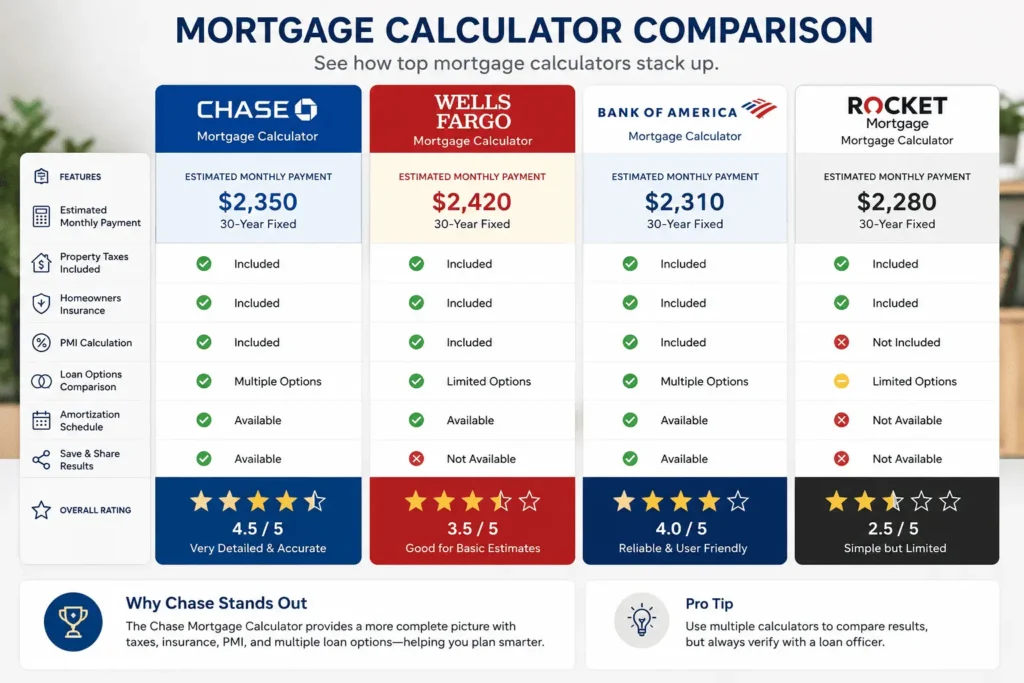
Comparing tools side by side makes it easier to see where Chase stands out and where it falls behind. Here’s how it stacks up against a few other major lender calculators.
| Feature | Chase | Wells Fargo | Bank of America | Rocket Mortgage |
|---|---|---|---|---|
| Free to use | Yes | Yes | Yes | Yes |
| Includes taxes & insurance | Yes | Yes | Yes | Yes |
| Requires credit score range | Yes | No | No | Yes |
| Shows loan options directly | Yes | Limited | Limited | Yes |
| Separate amortization tool | Yes | Yes | No | Yes |
Chase asks for a bit more upfront, but it rewards that with a more personalized set of loan options. Tools that skip the credit score step tend to give a rougher, more generic estimate.
If you’ve used more than one of these tools, you may have noticed the numbers don’t always line up. That’s normal, since each bank pulls slightly different average rate data and rounds things differently. The gap between the mortgage calculator Chase shows you and a competitor’s tool is usually small, often less than a few dollars a month, but it’s still worth checking more than one before you settle on a lender.
Other Chase Mortgage Calculators You Can Use
The main calculator isn’t the only tool worth knowing about. Chase offers several others built for specific situations:
- Affordability Calculator – estimates how much house you can afford based on income
- Amortization Calculator – breaks down how much of each payment goes to principal versus interest
- Extra Payments Calculator – shows how paying extra each month shortens your loan
- Mortgage Points Calculator – helps you decide if buying down your rate is worth it
- FHA and VA Calculators – built for government-backed loan programs
If you enjoy exploring loan numbers in a more hands-on way, tools like mortgage calculator games can also help beginners get comfortable with these same concepts before diving into the real thing.
Each of these smaller calculators solves a specific question instead of trying to cover everything at once. Using two or three together, like the affordability tool followed by the amortization tool, usually gives a fuller picture than relying on just one.
How to Lower Your Estimated Monthly Payment
Before you accept whatever number the mortgage calculator Chase shows you, try adjusting a few inputs first. Small changes can move your payment more than you’d expect.
- Increase your down payment to borrow less overall.
- Improve your credit score before applying, since it affects your rate.
- Buy discount points to lower your interest rate upfront.
- Compare a 15-year term against a 30-year term for the interest savings.
- Ask about avoiding PMI once you cross the 20% down payment mark.
Even a small shift, like a 1% higher down payment, can change your monthly number by a real amount. It’s worth testing a few combinations before settling on one plan.
Try running the same home price through the calculator two or three times, changing just one input each time. This makes it easy to see which change has the biggest impact on your specific situation, rather than guessing which strategy is worth pursuing.
Using the Chase Mortgage Calculator on the Chase MyHome App
Existing Chase customers can access many of these same tools through the Chase MyHome app instead of the website. Once you’re set up, you can run new estimates, track your loan, and manage payments from one place. If you already bank with Chase, this makes checking numbers a bit more convenient than switching between tabs.
You’ll need your Chase mortgage login details to access the full account features inside the app. The calculator itself is available without signing in, but account-specific tools require you to log in first.
Still unsure which numbers apply to your situation? Email james@allthings-mortgage.com and we can walk through it with you directly.
Conclusion
As promised at the start, you now know exactly how the mortgage calculator Chase offers works, what it includes, and where its limits are. You’ve seen a real example, a comparison against other bank tools, and answers to the most common questions buyers ask. Use it as your starting point, then confirm your final numbers with a loan officer before you commit. That combination gives you the clearest, most reliable picture of your future mortgage payment.
Frequently Asked Questions
How much house can I afford with Chase?
Chase generally suggests keeping your mortgage payment near 28% of your monthly gross income. Their affordability calculator factors in your income, debts, and down payment to give a more exact number. This helps you avoid overestimating what you can comfortably afford each month.
How much down payment do I need?
Your required down payment depends on the loan type you choose. Conventional loans often ask for at least 3% to 5%, while avoiding PMI usually requires 20%. FHA and VA loans may allow for lower down payments depending on your eligibility.
Fixed-rate vs. adjustable-rate — which should I choose?
A fixed-rate loan keeps your payment the same for the entire term, which helps with long-term budgeting. An adjustable-rate loan often starts lower but can rise or fall after the introductory period ends. Your choice usually depends on how long you plan to stay in the home.
How do interest rates affect my mortgage payment?
Your interest rate directly changes how much you pay each month and over the life of your loan. A higher rate means a bigger payment, while a lower rate reduces both your monthly cost and total interest paid. Even a small rate difference can add up to thousands over 30 years.
Is the Chase mortgage calculator free to use?
Yes, the calculator is completely free and doesn’t require you to create an account or apply for anything. You can run as many estimates as you want at no cost. It’s designed as a planning tool, not a binding offer.