
January rolls around and your mailbox stays empty while tax season creeps closer. You already filed your income slips, but the one form your accountant keeps asking for is nowhere in sight. That happened to a friend of mine last year, and she spent three days calling numbers that led nowhere. If you searched for RoundPoint Mortgage Tax Documents because you are stuck in that same spot, you are not alone.
This guide walks you through everything tied to your RoundPoint 1098 form, from what it contains to how you can pull it up online in minutes. You will also learn what to do if the form never shows up, how to fix a wrong amount, and how these documents affect your tax return. No confusing jargon, no runaround. Just clear steps you can follow today.
What Are RoundPoint Mortgage Tax Documents?
RoundPoint Mortgage Tax Documents are the yearly paperwork your loan servicer sends so you can file your taxes correctly. The main piece is IRS Form 1098, which reports the mortgage interest, insurance premiums, and property taxes tied to your loan. These figures matter because they can lower your taxable income if you itemize deductions. If you want the fuller picture on how RoundPoint Mortgage handles servicing beyond taxes, that guide covers payments and account setup too.
What Is IRS Form 1098 and Why RoundPoint Sends It
Form 1098 is a federal tax form that lenders and servicers must send to any borrower who paid $600 or more in mortgage interest during the year. RoundPoint sends this form because the IRS requires it, not because it is optional paperwork. The form gives you the exact numbers you need instead of guessing from bank statements. Without it, claiming a mortgage interest deduction becomes messy and error-prone.
The IRS also receives a copy of the same form directly from RoundPoint, so the numbers you report should match what shows on file. This is why guessing an approximate amount from memory is risky. A mismatch between what you file and what the IRS has on record can trigger a notice down the road. Using the exact figures straight from your form avoids that headache entirely.
What’s Included on Your RoundPoint 1098 Form
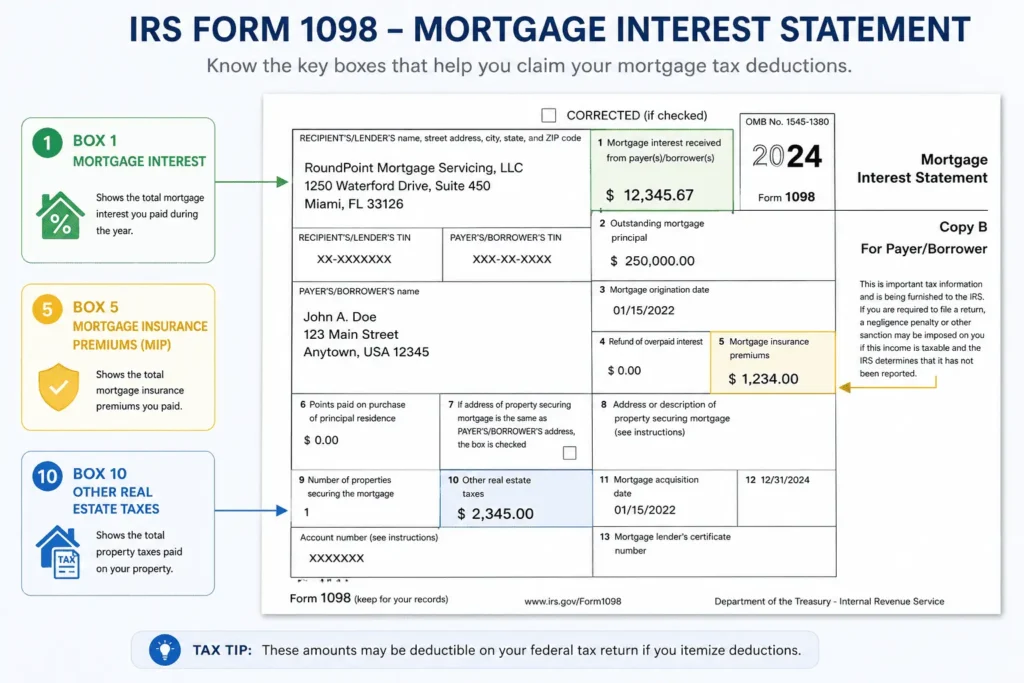
The form is short, usually just one page, but each box carries specific meaning for your tax return. Here is what the main sections cover.
Box 1 – Mortgage Interest Paid
Box 1 shows the total interest you paid on your loan during the calendar year. This is the figure most homeowners look for first. It directly feeds into your mortgage interest deduction if you itemize. Even a small gap between this number and your own records is worth checking.
Box 5 – Mortgage Insurance Premiums (MIP)
Box 5 lists any mortgage insurance premiums you paid through RoundPoint. Not every loan carries MIP, so this box may show zero for many borrowers. When it applies, these premiums can sometimes be deducted too, depending on your income level. Tax rules around MIP deductions shift from year to year, so double-check current limits.
Box 10 – Property Taxes Paid Through Escrow
Box 10 reports property taxes RoundPoint paid on your behalf if your loan has an escrow account. This number helps confirm your local tax bill was covered on time. It also gives you a paper trail for your own records. Homeowners without escrow will not see an entry here.
When Will You Receive Your 1098 Form From RoundPoint
RoundPoint mails paper 1098 forms by January 31 each year, matching the federal deadline for servicers. If you signed up for paperless delivery, your form usually posts to your online account around the same date. Mail delivery can take a few extra days depending on your location. Electronic access is almost always faster than waiting on the postal service.
Borrowers who transferred into RoundPoint mid-year sometimes worry their form will be delayed because of the switch. In most cases, the January 31 deadline still applies as long as your account was fully onboarded before year-end. If your transfer happened very late in December, check with support to confirm your exact timeline. Planning to file early is smart, but rushing before your form arrives usually causes more rework later.
How to Access and Download Your RoundPoint Tax Documents
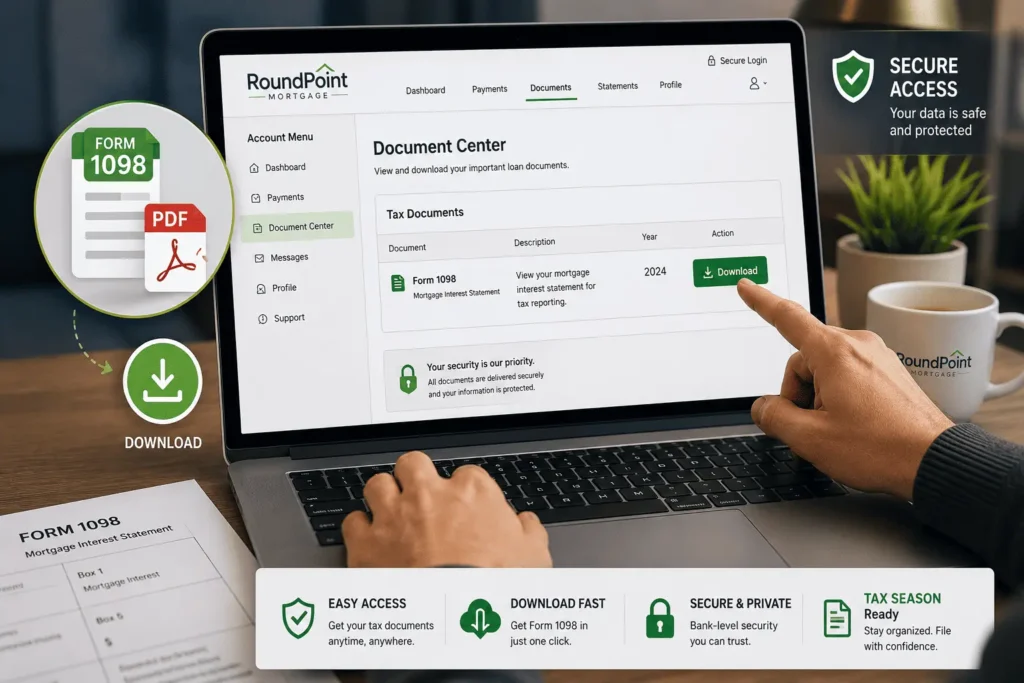
You do not need to wait for the mail if you have an online account already set up. Everything sits inside your document center once you sign in.
Step-by-Step: Logging Into Your You Are Home™ Account
First, go to the RoundPoint Mortgage login page and enter your username and password. Next, select “Account Management” and then “Document Center” from the dashboard menu. Choose the tax document category to see your available 1098 forms. From there, click download or print, whichever suits you.
How to Switch to Electronic (Paperless) 1098 Delivery
Inside your account, look for “Statements and Documents” and select the year-end statement option. Click the button to change your consent to electronic delivery. You will need to verify your email address to finish the switch. Once confirmed, future forms arrive online instead of by mail.
How Long Documents Stay Available in Your Account
RoundPoint keeps documents visible in your online account for roughly the last 14 months. Anything older than that window may not display anymore. If you need an older 1098 for an amended return, you may have to call support directly. Saving a copy locally each year avoids this hassle entirely.
What to Do If You Didn’t Receive Your 1098 Form
First, check your account online since paperless forms post before mail arrives. If nothing shows up there either, confirm your mailing address on file is correct. A wrong address is the most common reason forms go missing. If everything checks out and you still see nothing by mid-February, call RoundPoint directly and request a reissue.
Waiting too long past the filing deadline just adds stress you do not need. If your tax appointment is close and the form still has not arrived, ask your preparer whether an estimate based on your last statement can hold the return until the real number comes in. Most preparers have handled this situation before and can guide you through it. A quick phone call to support usually resolves the delay faster than expected. A quick phone call to support usually resolves the delay faster than expected, and if you would rather explain your situation in writing first, you can also email james@allthings-mortgage.com for guidance.
How to Request a Corrected or Amended 1098 Form
Sometimes the numbers on your form do not match your own records, and that needs fixing before you file. Start by comparing your loan statements against the 1098 to spot the exact discrepancy. Then contact RoundPoint to explain the issue and request a corrected form. Keep the RoundPoint mailing address handy in case you need to send documentation by mail as backup. Most corrections get reissued within a few weeks once the servicer confirms the error.
If you already filed your taxes before noticing the mistake, you may need to file an amended return once the corrected 1098 arrives. Talk to a tax professional about whether the change actually affects your refund or amount owed. Small differences of a few dollars usually are not worth amending over. Larger gaps in interest or escrow amounts are worth the extra paperwork to fix properly.
RoundPoint Not Listed in TurboTax or Tax Software — What to Do
Some borrowers open TurboTax or similar software and find RoundPoint missing from the lender dropdown list. This does not mean your form is invalid or unusable. Simply choose the option to type your 1098 details in manually instead of importing them. Enter the exact figures from your form, and the software will calculate everything the same way.
How to Use Your RoundPoint Tax Documents for Mortgage Interest Deduction
Your 1098 form is the backbone of the mortgage interest deduction claim on Schedule A. You take the number from Box 1 and enter it where your tax software or preparer asks for mortgage interest paid. This deduction only helps if your total itemized deductions beat the standard deduction amount for your filing status.
Itemizing vs Standard Deduction
Many homeowners assume they should always itemize because they pay mortgage interest. That is not always true anymore since standard deduction amounts have grown in recent years. Add up your mortgage interest, property taxes, and other itemized expenses first. Only itemize if that total is higher than your standard deduction option.
Property Tax Documents From RoundPoint (Escrow vs Non-Escrow Accounts)
If your loan has an escrow account, RoundPoint collects a portion of your property taxes with each monthly payment and pays your local tax authority directly. You can confirm this activity through your RoundPoint mortgage payment history and your year-end escrow statement. Borrowers without escrow are responsible for paying property taxes on their own and will not see this reflected in RoundPoint Mortgage Tax Documents at all. It helps to check with your county tax office directly if you fall into this second group.
What Is a Supplemental Tax Bill and How RoundPoint Handles It
A supplemental tax bill is a one-time charge your county sends when your property gets reassessed mid-year. This often happens after a purchase, new construction, or a major renovation. RoundPoint does not automatically pay these bills unless your escrow account has been updated to cover them. Homeowners usually need to forward supplemental bills to RoundPoint themselves to avoid a missed payment.
Some counties label this same charge an added assessment or an interim bill instead. The wording changes depending on where you live, but the purpose stays the same. Missing this bill can lead to late penalties from your local tax office, not from RoundPoint directly. Setting a reminder around the time you closed on your home helps you catch this bill before it becomes overdue.
Multiple 1098 Forms After a Refinance or Loan Transfer
If you refinanced or your loan transferred to a new servicer mid-year, you will likely get two separate 1098 forms. One comes from your original lender for the months before the change. The other comes from RoundPoint for the remaining months of that same year. Both forms need to be added together when you calculate your total mortgage interest deduction.
It helps to keep both forms in the same folder as soon as they arrive, since tax software will ask for each one separately in most cases. Do not assume the second form replaces the first one, because they usually cover different date ranges entirely. If either form looks incomplete, contact that specific servicer instead of RoundPoint, since each company only reports the months it actually serviced your loan.
RoundPoint 1098 Form vs Annual Escrow Statement — Key Differences
These two documents often get confused, but they serve different purposes at tax time.
| Feature | 1098 Form | Annual Escrow Statement |
|---|---|---|
| Purpose | Reports interest and taxes for IRS filing | Shows escrow account activity and balance |
| Sent by | RoundPoint, required by law | RoundPoint, as a servicing courtesy |
| Used for | Mortgage interest deduction | Reviewing tax and insurance payments |
| Deadline | January 31 | Typically January as well |
Common RoundPoint Tax Document Issues and Fixes
Most problems borrowers face fall into a handful of repeat categories.
| Issue | Fix |
|---|---|
| Form never arrived | Check online account, then confirm mailing address |
| Wrong interest amount | Compare records and request a corrected 1098 |
| Lender not in tax software | Enter figures manually instead of importing |
| Missing MIP amount | Confirm if MIP applied to your loan that year |
| Old form not visible online | Call support since only 14 months display |
How to Contact RoundPoint for Tax Document Support
If online access does not solve your issue, reaching a live representative is your next step. You can find the correct RoundPoint phone number for tax and servicing questions on their support page. Have your loan number ready before you call to speed things up. Support teams can often reissue documents or clarify discrepancies within the same call. Support teams can often reissue documents or clarify discrepancies within the same call, and if you need extra help understanding your paperwork, you can email james@allthings-mortgage.com and a member of our team will walk you through it.
Conclusion
Chasing down mortgage paperwork at tax time does not have to feel stressful anymore. You now know exactly where to find your RoundPoint Mortgage Tax Documents, what each box means, and what to do if something looks off. Whether your form arrived late, showed a wrong number, or your lender was missing from your tax software, you have a clear fix for each situation. File with confidence this year instead of guessing your way through it
Frequently Asked Questions
When does RoundPoint send the 1098 form?
RoundPoint mails paper 1098 forms by January 31 each year. If you chose paperless delivery, the form usually appears in your online account around the same time, often a few days earlier than mail arrives at your address.
How do I get my RoundPoint 1098 form online?
Log into your account, open Account Management, then Document Center. Select the tax documents category and choose the current year. From there you can view, download, or print your RoundPoint 1098 form instantly.
What if my RoundPoint 1098 is missing or wrong?
Check your online account first, then confirm your mailing address is correct. If numbers look wrong, compare them to your own loan records and contact RoundPoint to request a corrected form.
Can I deduct RoundPoint mortgage insurance premiums?
Sometimes, depending on your income and the tax year rules in effect. Box 5 on your 1098 shows the MIP amount paid, but you should confirm current deduction limits before claiming it.
Why isn’t RoundPoint listed in my tax software?
This is common and does not affect your form’s validity. Simply select the manual entry option and type in the figures directly from your RoundPoint Mortgage Tax Documents instead of searching the lender list.